<!-- Source: https://www.stormkit.io/docs/features/writing-api -->
<!-- Title: API -->
<!-- Description: How to create api endpoints using Stormkit. API end points will be deployed to aws lambda. -->

# Writing APIs

<section>

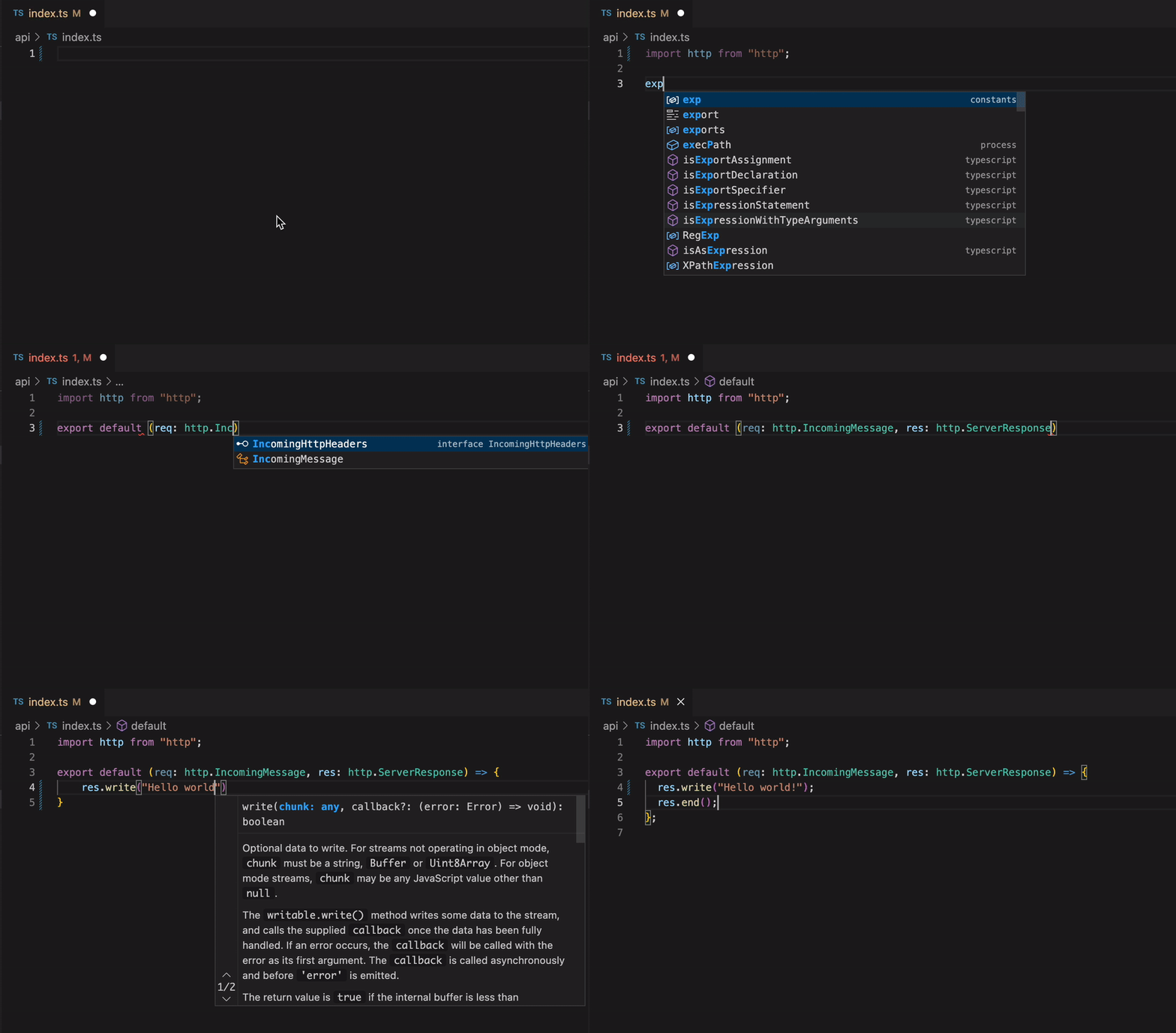
You can create node.js/typescript APIs using Stormkit.

<div class="img-wrapper">
  <img src="/assets/docs/features/api-hello-world.gif" alt="API Hello World" />
</div>

</section>

## Serverless functions on self-hosted instances

<div class="blog-alert">

On Stormkit Cloud, functions run on managed function infrastructure (AWS Lambda). A
self-hosted instance has none by default, so it forks a short-lived `node` process per
invocation instead — fine for parity and local development, but not for production
traffic.

For a self-hosted backend, use a
[**Start command**](/docs/deployments/application-runtime) and run a long-lived server.
See [when to use it](/docs/deployments/application-runtime) for the trade-offs.

</div>

## How it works

> **Note: On Stormkit Cloud, function timeouts are set at 15 seconds. If you require a different timeout, please inform us, and we can adjust it to suit your workflow. Work that legitimately runs longer — headless-browser rendering, video processing, large report generation — does not belong in a function. Self-hosted instances do not apply this limit, but a function still forks a fresh `node` process per request; run that kind of work behind a [Start command](/docs/deployments/application-runtime) server instead.**

<section>

During build time, Stormkit checks if there is a `.stormkit/api` folder. When the folder is found,
it uploads the folder to a lambda function. The <a href="https://github.com/stormkit-io/serverless/blob/main/src/utils/callbacks/api.ts#L44" target="_blank" rel="noopener noreferrer">entry file</a> of the function then takes the `Request` and calls the relevant file based on file system routing. If nothing is found, it returns 404.

</section>

## Write and deploy your API

<section>

Create an `/api` folder in the top level of your repository and an `/index.ts` file in it.
Each file is treated as a separate endpoint and it needs to export a default function
with the signature shown below.

```ts
// api/index.ts
import http from 'http'

export default (req: http.IncomingMessage, res: http.ServerResponse) => {
  res.write('Function endpoint: /api')
  res.end()
}
```

```ts
// api/user/subscribe.ts
import http from 'http'

export default (req: http.IncomingMessage, res: http.ServerResponse) => {
  res.write('Function endpoint: /api/user/subscribe')
  res.end()
}
```

The table below shows how the API routing works.

```ts
+ /api
  - index.ts        // /api
  + /users
    - index.ts      // /api/users
    - subscribe.ts  // /api/users/subscribe
    - create.ts     // /api/users/create
    + /[id]
      - remove.ts   // /api/users/:id/remove (where :id is a placeholder for dynamic values)
```

<p class="mt-4">
<div>
For more details on how the filesystem routing works, check the <a href="https://github.com/stormkit-io/serverless/blob/main/src/utils/filesys.ts#L32" target="_blank" rel="noopener noreferrer">source code</a> of the matchPath function.
</div>
</p>

Now go ahead and [deploy](/docs/deployments/introduction) your application. When Stormkit detects an `/api` source folder,
it checks whether it is already built or not. If the `/api` folder is not yet built, Stormkit tries to build
your api using Webpack and then deploys the output to the lambda function. This process is automatic.

</section>

## Matching endpoints by request method

<section>

By default, files are matched through all requests. If you want to restrict certain endpoints with a request method, you can specify the method in the file name, right before the extension.

```ts
+ /api
  - index.ts            // ALL /api
  + /users
    - index.get.ts      // GET /api/users
    - index.post.ts     // POST /api/users
    - subscribe.ts      // ALL /api/users/subscribe
    + /[id]
      - index.delete.ts // DELETE /api/users/:id
```

</section>

## Ignore certain files

If a file name starts with an underscore (`_`) the file won't be matched. If the directory starts
with an underscore (`_`), the whole subdirectory tree will be ignored. This is useful to organize
helper methods in different files.

## Custom builds

<section>

If your source code contains more complex use cases and Stormkit fails to build, you can build the source code
yourself. Here's the `webpack` config Stormkit uses to build the api. You can copy this and extend it based on
your needs.

```ts
import type { Configuration } from 'webpack'
import * as webpack from 'webpack'
import * as path from 'path'
import * as dotenv from 'dotenv'
import { glob } from 'glob'

const config: Configuration = {
  mode: 'production',
  target: 'node',

  // Iterate over the `api` subfolder and create an entry file
  // for each `.ts` file. This will tell webpack to create a bundle
  // for each function.
  entry: glob.sync('./api/**/*.{js,ts,tsx}').reduce((acc, file) => {
    acc[file.replace(/^\.\/api\//, '').split('.ts')[0]] = file
    return acc
  }, {}),

  output: {
    filename: '[name].js',
    // Build into `.stormkit/api` - Stormkit will take care of the rest.
    path: path.resolve(__dirname, '.stormkit/api'),
    // We need to use commonjs so that webpack exports the functions.
    library: {
      type: 'commonjs',
    },
  },

  module: {
    rules: [
      {
        test: /\.ts$/,
        loader: 'ts-loader',
        options: {
          compilerOptions: {
            noEmit: false,
          },
        },
      },
    ],
  },

  resolve: {
    extensions: ['.tsx', '.ts', '.js'],
  },

  // Inject .env variables into the bundles.
  plugins: [
    new webpack.DefinePlugin(
      Object.keys(dotenv.config() || {}).reduce((obj, key) => {
        obj[`process.env.${key}`] = JSON.stringify(process.env[key])
        return obj
      }, {})
    ),
  ],
}

export default config
```

</section>

## Testing locally

<section>

In order to test the API locally go ahead and install the [`@stormkit/cli`](https://www.github.com/stormkit-io/stormkit-cli) package.

```bash
npm i -D @stormkit/cli
```

Update `package.json`:

```json
{
  "scripts": {
    "dev:api": "stormkit api"
  }
}
```

And run the script:

```bash
npm run dev:api
```

You can access the api from http://localhost:9090/api.

</section>

## API in action

If you wish to see the API in action promptly, take a look at our [template project](https://github.com/stormkit-io/monorepo-template-react), utilizing Vitejs as the build tool. This project encapsulates server-side rendering (SSR), API functionality, and a single-page application.